
1. The short answer
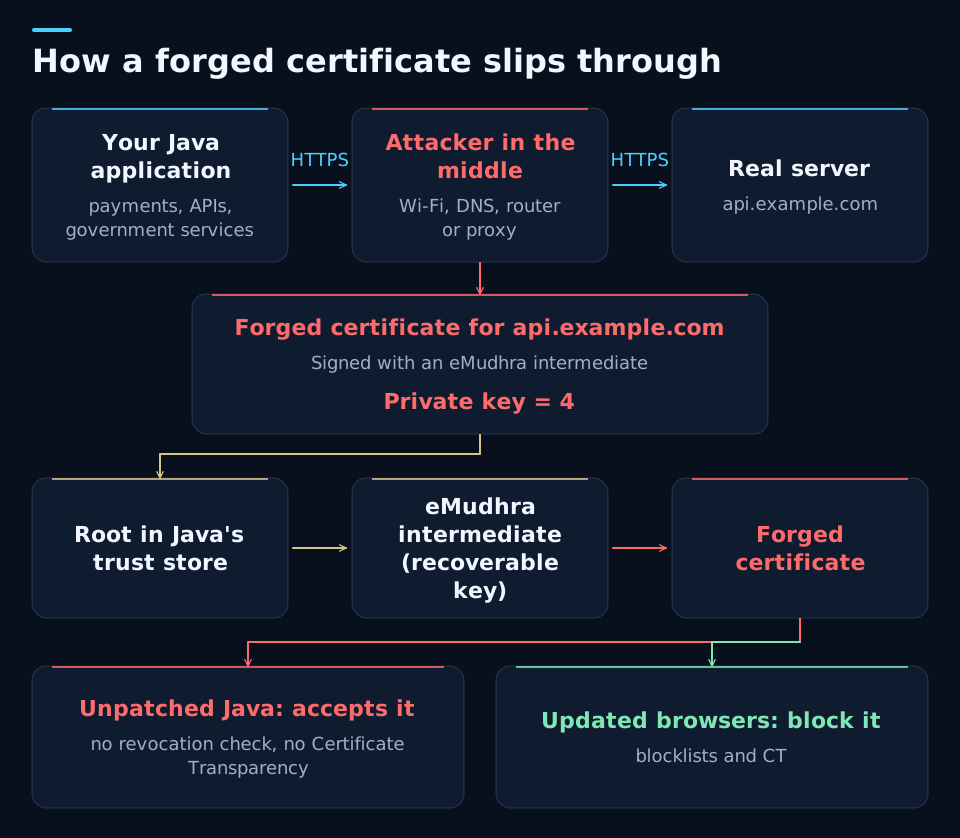
Yes, it is real and worth acting on this week. It affects any Java application that connects over HTTPS to other servers: payment gateways, banks, APIs or government services. An attacker sitting in the middle of the network can pose as that server and read or change what travels. It is not a door open to the whole internet, but the fix is so cheap that waiting does not pay off.
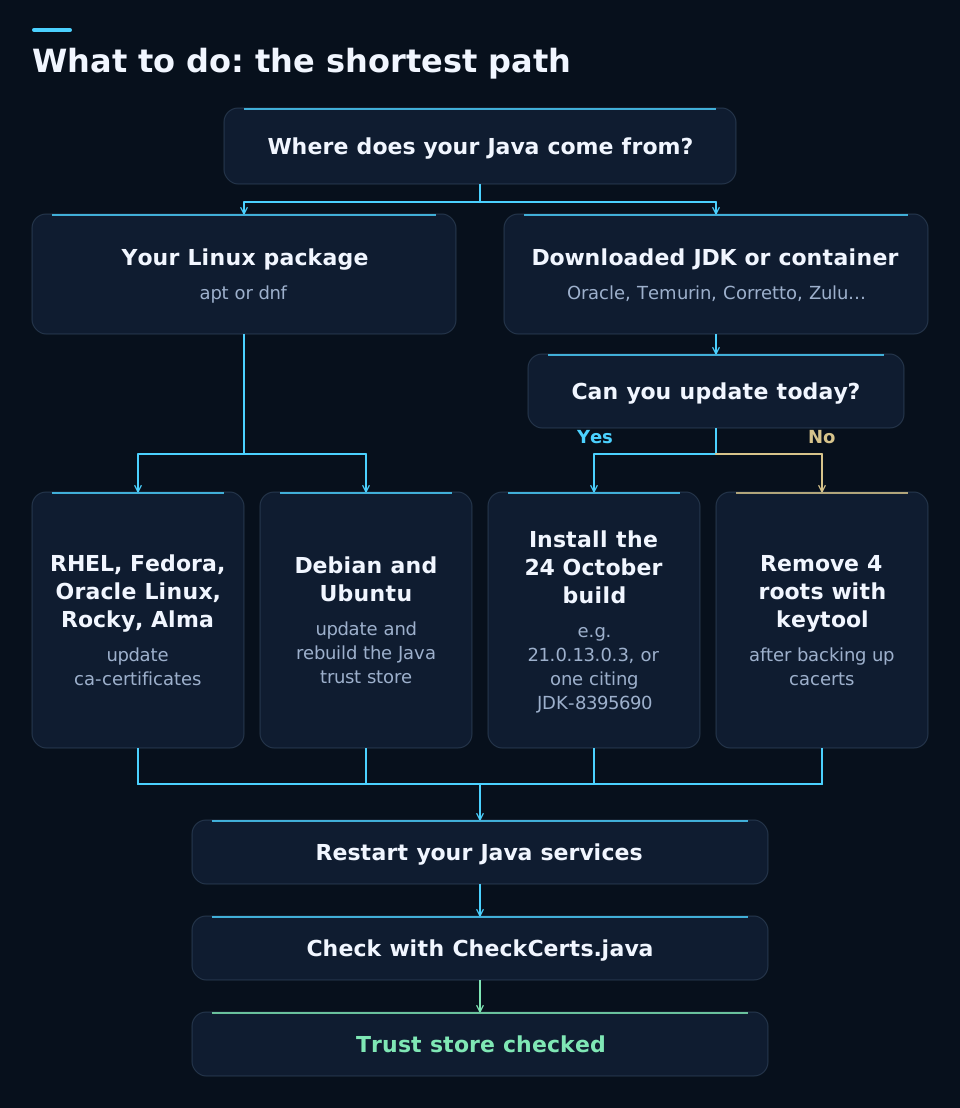
If you can update Java, install the 24 October build. If you cannot, remove the four roots with keytool today. Either way, restart and check.
2. What happened, in 30 seconds
eMudhra, an Indian certificate authority that sells certificates under the emSign brand, generated eight intermediate certificates in April 2025 with a serious flaw: their private keys were tiny numbers. One was literally 4. Anyone can recompute them from the certificate itself, which is public.
With one of those keys you can sign a valid certificate for any domain. On 17 October 2026 a researcher reported it to the browser makers, who blocked them within days. eMudhra revoked them on the 18th and Sectigo, which had cross-signed them, on the 19th. Java kept trusting them until Oracle published two emergency alerts outside its quarterly schedule.
| Oracle alert | Date | What it fixes |
|---|---|---|
| CVE-2026-91403 | 21 October | Stops trusting the 8 intermediates and their versions cross-signed by Sectigo. |
| CVE-2026-114820 | 24 October | Removes 4 roots from the trust store: the 2 related to the intermediates (emSign ECC Root CA - G3 and AAA Certificate Services) and 2 more from eMudhra. This is the build you need. |
3. Why Java is the weak link
Your browser was already protected. Your Java application was not, for three reasons worth knowing because they will come up again in the next incident.
Java ships its own list of trusted authorities, the cacerts file. It does not receive the blocks that Chrome, Firefox or Windows roll out automatically.
By default it does not check whether a certificate has been revoked. eMudhra revoking them changes nothing for Java.
It does not require the certificate to appear in the public Certificate Transparency logs. A forged certificate that was never logged gets through without those logs giving it away.
What an attacker in the middle could do
- Read credentials, API tokens and personal data that your application sends to its providers.
- Change responses: a payment status, an amount or the result of a validation.
- Slip a malicious dependency into a Maven or Gradle build.
- Pass off a malicious JAR as signed, because two of the intermediates were for code signing.
Cheap and hard to detect
The keys have been recoverable since April 2025 and one is already published. A forged certificate used against Java need not appear in the public logs. There is no confirmed exploitation, but it cannot be ruled out either.
The attacker must be in the middle
The attacker needs to control the network path: a Wi-Fi network, a poisoned DNS, a router or a proxy. Red Hat, in a preliminary assessment with more demanding attack assumptions, puts it at 6.8. The risk lies in the connections your Java opens outwards, not in those your website receives.
4. Am I affected? Check in one minute
It affects Oracle Java SE 8, 11, 17, 21, 25 and 27, GraalVM and any OpenJDK distribution whose trust store still holds those roots. It also affects unsupported versions and applications that ship their own Java, such as AutoFirma, OpenSearch or development environments. The fastest way is to look.
Step 1. Find the java.home of each service and store it in the JH variable:
java -XshowSettings:properties -version 2>&1 | grep java.home
JH="/opt/java/jdk-21"
KS="$JH/lib/security/cacerts"
Step 2. Download the official OpenJDK check and run it with the same Java the service uses. With Java 11 or later:
curl -fsSLO https://cr.openjdk.org/~mr/CheckCerts.java &&
"$JH/bin/java" CheckCerts.java
With Java 8 to 10, or if that Java has no compiler (a JRE, for example), compile it with any JDK's javac and run the class with the service's Java. The javac warnings are normal:
curl -fsSLO https://cr.openjdk.org/~mr/CheckCerts.java &&
javac -source 8 -target 8 CheckCerts.java &&
"$JH/bin/java" -cp . CheckCerts
On Windows, the check is included in the option 2 blocks.
If it replies No bad root certificates found, that trust store is clean. If it shows BAD ROOT with emSign ECC Root CA - G3 or AAA Certificate Services, read on. The emSign Root CA - G1 and G2 roots are not linked to the compromised intermediates, although Oracle removes them too.
Note: it checks the trust store of the Java you run it with. If a service starts with a different trust store, for example via the -Djavax.net.ssl.trustStore option, review that one separately.
I recovered all eight private keys from the public certificates in seconds: they are all numbers below 256, and the one for the EM OV TLS CA - G3C intermediate is literally 4. On an unpatched Java 25.0.3, connecting to the incident's test servers returns 200 as if nothing were wrong. After removing the four roots, Java rejects it and the control websites I tested keep working.
5. Option 1: update Java (recommended)
This is the clean route. Install the build for your release line published on 24 October, which blocks the intermediates and also removes the roots. The 21 October builds, such as 21.0.13.0.2, only do the first part.
| Release line | Oracle build with the complete fix |
|---|---|
| Java 8 | 8u511-b33 |
| Java 11 | 11.0.33.0.3 |
| Java 17 | 17.0.21.0.3 |
| Java 21 | 21.0.13.0.3 |
| Java 25 | 25.0.5.0.3 |
| Java 27 | 27.0.1.0.3 |
If you use another OpenJDK distribution, such as Temurin, Corretto, Zulu or Red Hat's build, look for JDK-8395690 or CVE-2026-114820 in its release notes and confirm it with the check in section 4. Oracle GraalVM is also affected and has its own update.
Unsupported versions, such as Java 23 or 26, no longer receive patches. Use option 2 and plan the move to a long-term support release. And remember that the change only takes effect once you restart each service and rebuild the container images that carry Java inside.
6. Option 2: no update, four commands
If you cannot change version today, do by hand what the patch does: remove the four affected roots from the Java trust store. You do not change version or recompile anything. You just restart.
Linux or macOS, from Java 8 to Java 27. It makes a uniquely named backup and only removes the roots if the backup succeeds:
JH="/opt/java/jdk-21"
KS="$JH/lib/security/cacerts"
B=$(sudo mktemp "$KS.bak-$(date +%Y%m%d)-XXXXXX") && sudo cp "$KS" "$B" &&
for a in emsignrootcag1 emsignrootcag2 emsigneccrootcag3 comodoaaaca; do
  sudo "$JH/bin/keytool" -delete -keystore "$KS" -storepass changeit -alias "$a [jdk]"
doneWindows, from PowerShell run as administrator. If the backup fails it deletes nothing:
$JH = "C:\Program Files\Java\jdk-21"
$KS = "$JH\lib\security\cacerts"
try {
  [IO.File]::Copy($KS, "$KS.bak-$(Get-Date -Format yyyyMMdd-HHmmss)", $false)
  foreach ($a in "emsignrootcag1","emsignrootcag2","emsigneccrootcag3","comodoaaaca") {
    & "$JH\bin\keytool" -delete -keystore $KS -storepass changeit -alias "$a [jdk]"
  }
} catch { Write-Warning $_ }
Then, in the same console, run the check. With Java 11 or later:
try {
  Invoke-WebRequest https://cr.openjdk.org/~mr/CheckCerts.java -OutFile CheckCerts.java -ErrorAction Stop
  & "$JH\bin\java" CheckCerts.java
} catch { Write-Warning $_ }
With Java 8 to 10, or if that Java has no compiler, run this other check block instead. It needs javac from JDK 8 or later:
try {
  Invoke-WebRequest https://cr.openjdk.org/~mr/CheckCerts.java -OutFile CheckCerts.java -ErrorAction Stop
  javac -source 8 -target 8 CheckCerts.java
  if ($LASTEXITCODE -eq 0) { & "$JH\bin\java" -cp . CheckCerts }
} catch { Write-Warning $_ }
Replace the path on the first line with your java.home. changeit is the default trust store password. If keytool suggests using the -cacerts option, that is fine. If it says an alias does not exist, the final check will tell you whether any root remains under another name.
Restart your Java services. On Linux and macOS, repeat the check from section 4. It should say No bad root certificates found.
If a legitimate connection stops working, restore the cacerts.bak-… backup over cacerts and restart. But be aware: this trusts those roots again and reopens the risk. Use it only to restore service while you update Java or sort out that connection.
7. If your Java comes from your Linux distribution
If you installed Java with apt or dnf, it usually uses the system trust store and updating it is enough. There is one important exception on Debian and Ubuntu.
RHEL 8, 9 and 10, Fedora, Oracle Linux, Rocky and Alma (on RHEL 7 the fixed package is still pending):
sudo dnf upgrade ca-certificatesDebian and Ubuntu: updating is not enough, because of a long-standing bug in ca-certificates-java that does not remove from the Java trust store what the system has already withdrawn. You need to rebuild it:
Before rebuilding: this wipes any internal CAs that someone added by hand with keytool to that trust store. Those installed in /usr/local/share/ca-certificates come back on their own. If you had any added by hand, import them again from the backup before restarting. If a step fails, the block stops.
sudo apt update &&
sudo apt install --only-upgrade ca-certificates ca-certificates-java &&
B=$(sudo mktemp /root/java-cacerts.bak-XXXXXX) && sudo cp -L /etc/ssl/certs/java/cacerts "$B" &&
sudo rm -f /etc/ssl/certs/java/cacerts &&
sudo update-ca-certificates --fresh
Then restart your Java services and check with CheckCerts. If emSign ECC Root CA - G3 or AAA Certificate Services still show up, your ca-certificates package does not yet include the fix.
8. What this case asks of compliance
If your organisation works under the ENS, ISO 27001, NIS2 or handles personal data, this is not just a technical tweak. It is a test of whether your vulnerability management really works.
- Inventory. Know which Java runs on servers, containers, continuous integration and third-party applications that bring their own, which may restore their original trust store when they update. What is not inventoried does not get patched.
- Evidence. Record what you checked, what you changed and when. That is what the ENS (op.exp.4), ISO 27001 (control 8.8) and NIS2 (Article 21) expect.
- Unsupported versions. A Java that no longer receives patches is a debt this case makes visible. Plan the move to Java 21 or 25.
- Possible breach. If you suspect someone intercepted traffic containing personal data, assess whether it is a breach you must notify within 72 hours (GDPR, Article 33).
Frequently asked questions
Is it as serious as Log4Shell?
No. Log4Shell allowed code to run on a server with a single request. Here the attacker must sit in the middle of the network to impersonate an HTTPS server to your Java application. It is serious because it is hard to detect, but it requires a position the attacker does not always have.
I updated Java on 21 October. Am I covered?
Only partly. That build stops trusting the eight known intermediates. The 24 October build, for example 21.0.13.0.3, also removes four roots from the trust store, including the two related to those intermediates. Install it or run the keytool commands, which do no harm if a root is already gone.
My application sits behind nginx or Apache. Am I affected?
The proxy protects the connections you receive, not the ones your application opens outwards. If your Java calls payment gateways, banks, APIs or government services over HTTPS, those connections remain exposed until you fix it.
Can removing those roots break anything?
It is the same change Oracle's official patch makes. Current Sectigo chains usually end at USERTrust or its newer roots, not at AAA, and in my tests the usual destinations kept working. Even so, an older service could depend on it, so test your critical connections. If you restore the backup, you get the connection back but also the trust in those roots.
I use Java 23 or another unsupported version. What should I do?
No patch is coming. Apply option 2 today, which works on any version from Java 8 onwards, and plan the move to a long-term support release such as Java 21 or 25.
What if my Java runs in Docker containers?
Each image carries its own Java and its own trust store, so updating the host does not fix it. The cleanest route is to rebuild it on a base image that is already fixed and check it with CheckCerts. If there is none yet, add a RUN step to the Dockerfile that runs keytool -delete -cacerts -storepass changeit for each of the four aliases (Java 11 onwards) and redeploy the containers.
Can I enable revocation checking instead of removing roots?
It is another route OpenJDK mentions, adding -Dcom.sun.net.ssl.checkRevocation=true and -Dcom.sun.security.enableCRLDP=true at startup. But it adds network lookups to connections and, if the revocation list cannot be reached, the connection fails. For minimal impact, I prefer removing the roots.
Sources consulted
Cut-off date: 25 October 2026. The situation is evolving: check the official sources before acting.
- Oracle Security Alert CVE-2026-91403
- Oracle Security Alert CVE-2026-114820
- OpenJDK: Compromised Certificates and OpenJDK Java Runtimes
- OpenJDK Vulnerability Advisory 2026/10/21
- Oracle JDK 21: consolidated release notes
- eMudhra Intermediate CA Compromise
- Mozilla Bugzilla 2083449: eMudhra private key compromise of intermediate certificates
- Red Hat: CVE-2026-91403
- GitHub Advisory GHSA-9h75-rf66-wh3r
Not sure which Java you run in production?
I can inventory your Java runtimes, apply the fix with a rollback path and leave you the evidence ready for the ENS, ISO 27001 or NIS2.
